Bimmetrix is an independent third-party application for compatible BMW vehicles. It is not affiliated with, sponsored by, or endorsed by BMW Group.
View your vehicle’s last reported position, mileage, trunk and window status, cabin climate, battery charge, fuel level, range, charging and service information. Available readings depend on your vehicle, market, equipment and BMW CarData access.
DASHBOARD AND GLANCE
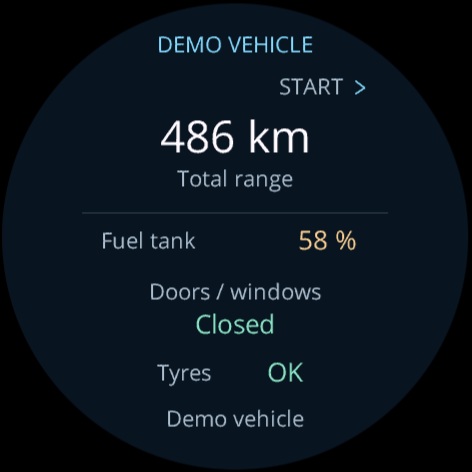
The dashboard shows total range, fuel level, doors/windows closure and BMW tyre diagnosis. Start opens more metrics; a left dot rail marks the selected item. The glance shows cached range, closure and tyres without additional BMW requests.
Closed requires explicit closed door/window readings; open or partly open readings show Not closed. Missing readings show Unknown. This is physical closure, not central locking. Tyres Check uses BMW CarData yellow/red diagnosis for mounted tyres (defects, wear or age). OK requires green defect/wear results for all four tyres; incomplete results show Unknown. Pressure differences and unavailable central-wheel readings do not trigger Check. Diagnosis is cached for six hours and refreshed while the app is open, within the REST budget. CarData may differ from My BMW in coverage and reporting time. See Tyre readings for pressures and Tyre diagnosis for BMW results.
SETUP
1. Sign in to your BMW account and open your vehicle’s CarData / Technical access section. Start at https://bmw-cardata.bmwgroup.com/customer/public/
2. Create a CarData client and subscribe it to CarData API. Copy the Client ID.
3. In Bimmetrix settings in the Connect IQ app, paste it into BMW CarData Client ID and save. Turn off Explore demo vehicle.
4. Open Bimmetrix on your watch and select Connect BMW. Press Start to request an authorization code.
5. On your phone, open the BMW authorization page shown on the watch: https://customer.bmwgroup.com/oneid/link. Sign in to BMW, approve the code shown on your watch, then return to Bimmetrix.
If several primary vehicles are available, choose one with Up/Down and Start. Repeat sign-in if BMW revokes or expires authorization. Your BMW password is entered on BMW’s website.
REFRESH AND PRIVACY
A consolidated response supplies the telemetry screens. Data is cached locally for an hour and checked for refresh when you open the app and while it remains running. Exact hourly background updates while the app is closed are not promised. Last valid values remain available after connection failures, with retrieval and BMW report timestamps.
The app enforces a local maximum of 50 CarData REST attempts per UTC day and reserves ten attempts for essential telemetry and setup. BMW may apply its account limit earlier when other clients use the same account. Automatic token renewal is separate from telemetry retrieval.
BMW tokens and vehicle cache are held on your Garmin device. Requests travel through Garmin Connect to BMW. The developer operates no relay for this version. Position is last reported vehicle data, not live tracking. Official CarData remote trunk, window and ventilation commands are not implemented.
Beta test build. Real BMW account compatibility must be verified by testers. Demo mode lets you inspect the interface with fictional readings.
Bimmetrix Privacy Policy
Privacy Policy for Bimmetrix, developed by Mihail Stacanov. Effective November 13, 2026.
Data processed
With your BMW authorization, Bimmetrix reads available vehicle telemetry, including identifiers, last reported position, mileage, battery and fuel readings, charging, door, trunk, window and climate statuses. Availability depends on your vehicle and BMW CarData access. Demo mode uses fictional values.
Connection and recipients
Requests use your paired phone and Garmin Connect to communicate with BMW CarData and BMW authorization services. Your BMW password is entered on BMW’s website. The developer operates no relay server for this version and does not receive your Client ID, BMW tokens, vehicle location or telemetry through the app. BMW and Garmin process network and account information under their own policies. The app contains no advertising or developer analytics.
Local storage and security
Your Client ID, authorization tokens, selected vehicle, telemetry cache, source timestamps and request counters are stored in application-private Garmin storage. Caches are separated by authorization owner. This is not a claim of hardware encryption; a person with access to your device or its backups may have access to stored data. Failed requests retain the latest valid readings.
Your choices and retention
You can revoke access through BMW CarData and uninstall Bimmetrix to remove its local data according to Garmin platform behavior. Revocation does not itself erase cached readings already held on your watch; uninstall to remove them. Your data held by BMW or Garmin follows those services’ retention rules. Stop using the app if you do not want further vehicle requests.
Support and contact
If you contact support, the developer receives the message and information you choose to provide. Do not send passwords, Client IDs, authorization codes, tokens, VINs or precise vehicle positions. Contact mihail@stacanov.email for privacy requests concerning information available to the developer.
Bimmetrix is an independent third-party application for compatible BMW vehicles. It is not affiliated with, sponsored by, or endorsed by BMW Group.